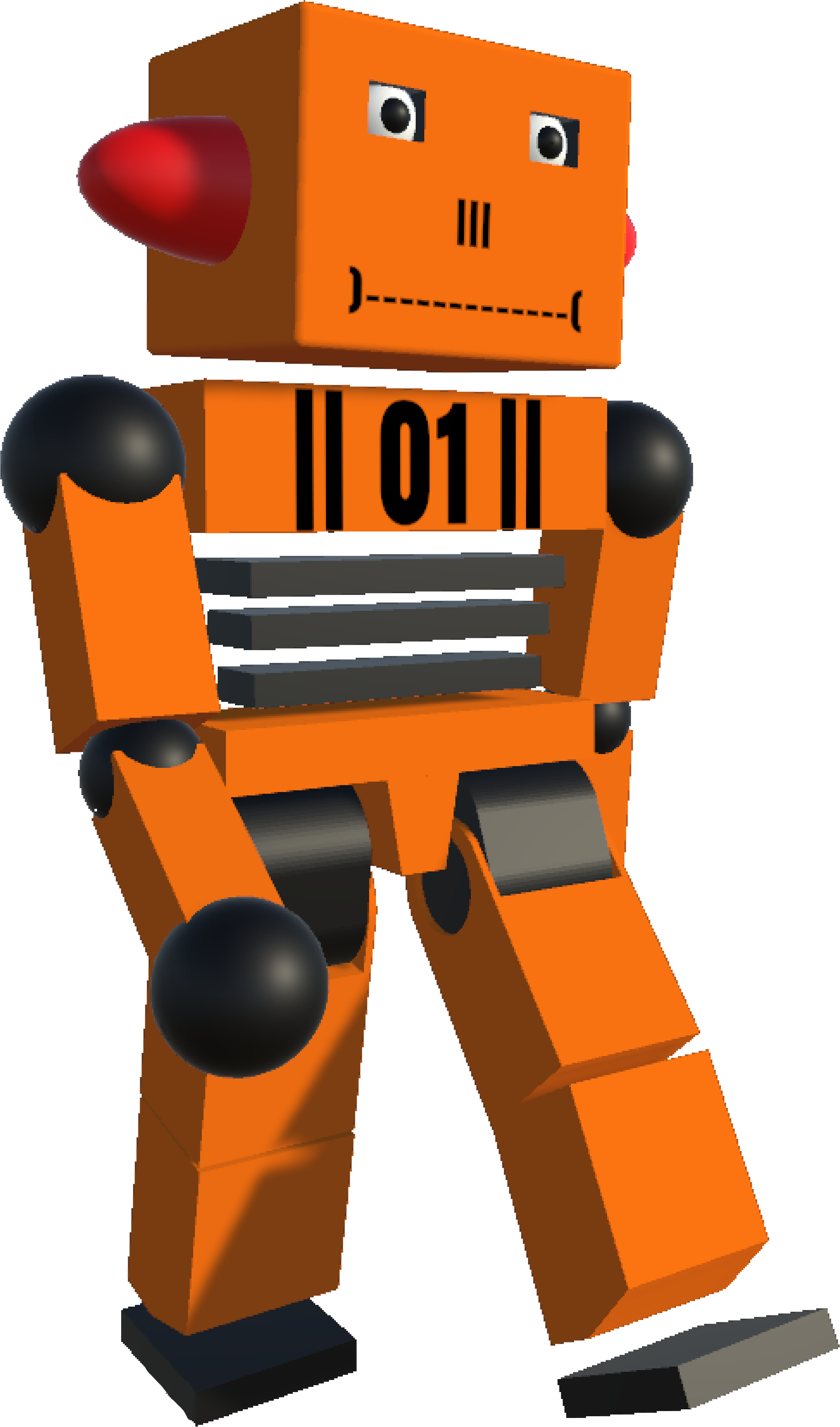
01
Learning to walk
Finding balance, moving towards a target and coordinating both legs.
The gait can still be asymmetric. Reward design played a decisive role.
APPLIED AI / REINFORCEMENT LEARNING
I built DELMO, a simulated bipedal robot that learns to walk, navigate stairs and get back up. Four months exploring the relationship between a body, an environment and a reward.
Explore the resultsof learning and iteration
joints
axes of rotation
specialised models
01 / THE RESULTS
Learned behaviours, with their successes and limitations. Each video shows a stage of the project.
Finding balance, moving towards a target and coordinating both legs.
The gait can still be asymmetric. Reward design played a decisive role.
Adapting the gait to terrain that requires lifting the feet.
Success depends on the learned gait and step height.
Recognising posture and coordinating the body to stand up again.
Specialised models are used; some movements remain unnatural.
02 / THE METHOD
I started with no experience in Unity or Blender. The project brought together 3D modelling, physics simulation and reinforcement learning.
Explore the technical details ↓Model the parts, assemble the joints and define their limits in Unity.
Describe posture, movement and obstacles using body observations and ray sensors.
Train with Unity ML-Agents, primarily using PPO, and refine rewards based on observed behaviour.
03 / THE CHALLENGES
Unexpected behaviours were often the most instructive. These three problems helped shape the project.
The agent learned to stay near its target instead of touching it: waiting earned more reward.
My takeaway: evaluate the behaviour a reward encourages, not just its numerical value.
Learning to get up degraded the walking behaviour. After several experiments, I used three specialised models, selected according to the situation.
My takeaway: choosing an appropriate architecture matters as much as tuning the model.
More flexible joints made getting up easier, but made walking harder to learn.
My takeaway: design the body, observations and learning process together.
04 / THE TECHNICAL NOTEBOOK
The project stages, settings and observations, ready to explore at your own pace.
| Algorithm | Network | Batch size | Buffer size | Learning rate |
|---|---|---|---|---|
| PPO | 4 × 256 | 4 096 | 40 960 | 3 × 10⁻⁴ → 1 × 10⁻⁴ |
To familiarize myself with Unity and ML-Agents, I started with a more modest project, the tutorial for which can be found on the Internet.
Then I made it more complex to get a better idea of the capabilities of ML-Agents.
First project completed, the tutorial for which can be found online.
The agent has the position of its target and moves in X Z to reach it.
Second project inherited from the first where the agent moves back and forth and turns around.
This time it uses sensors to move.
Third project that builds on the second but asks the agent to collect 3 cibless in a specific order.
In order: Red, Yellow then Green.
To my knowledge, there are few environments that allow reinforcement learning like Unity does with ML-Agents, which offers an interface allowing communication between the Python training process and the graphics engine. This communication is far from perfect, and I had to modify the ML-Agents library to improve communication and enable curriculum learning.
For creating 3D models, I used Blender. Blender is a comprehensive, free, and open-source modeling software. Quite difficult to handle, it has many online resources and a large community.


The robot was modeled in 3D in Unity, with an articulated structure comprising 39 rotation axes distributed across 17 joints. Each joint is equipped with constraints and forces to simulate realistic movements.
The agent has 365 sensors allowing it to understand its environment and its own position, in addition to 20 ray sensors placed on its shins and head to detect obstacles and the ground.
A capsule was placed on its head. This displays, through its color and intensity, the robot's performance. It is white by default if the agent receives no reward. If it is green, it means it is performing well. If it is red, it means it is receiving many penalties.
Evolution of the robot's design over time.
In this excerpt, we can see the sensors (rays) used by the robot to understand its environment.
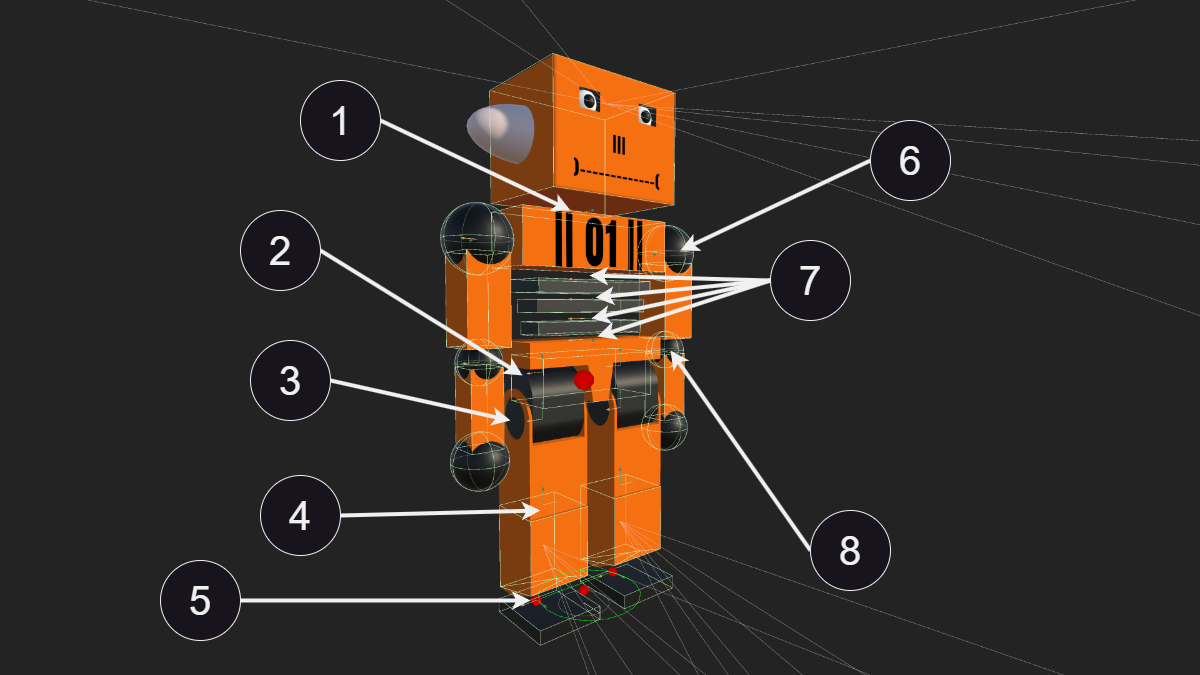
1. Head joint (X Y Z)
2. Hip joint (X Y Z)
3. Ankle joint (X Y Z)
4. Knee joint (X)
5. Ankle joint (X Y Z)
6. Shoulder joint (X Y Z)
7. Vertebrae and torso joint (X Y Z)
8. Elbow joint (X)
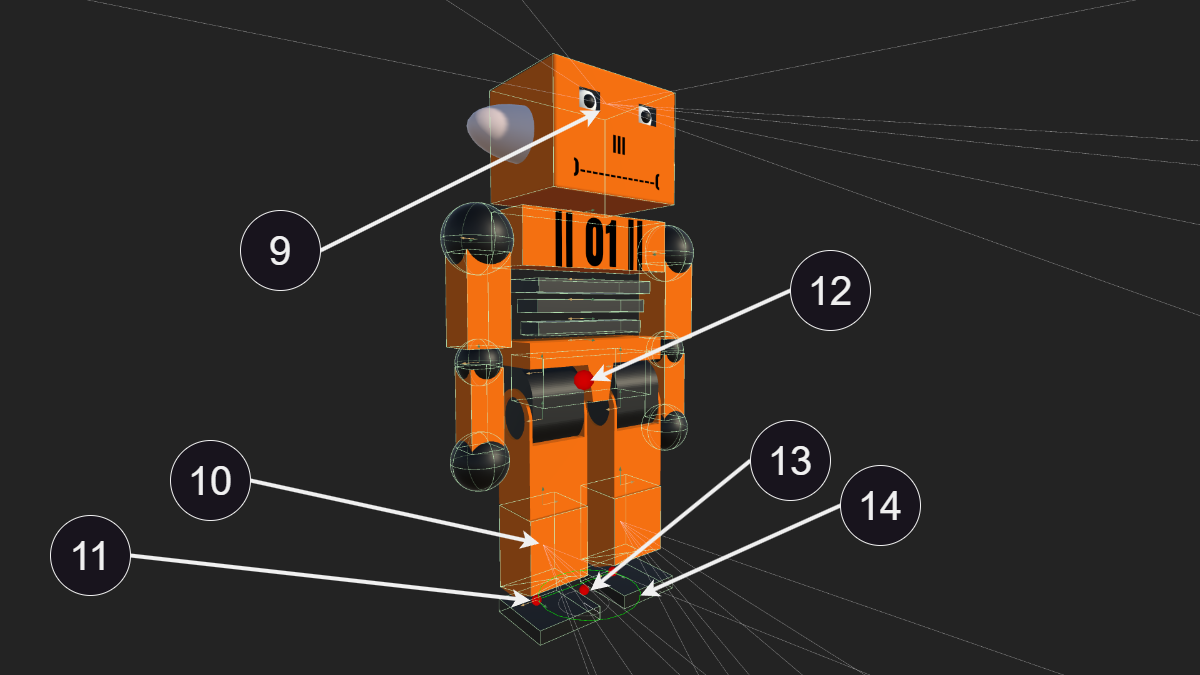
9. Head sensors
10. Sensors on the shins
11. Thigh joint (X)
12. Center of gravity
13. Center of gravity projected on the ground
14. Circle between the feet
The environment plays an important role in the agent's learning. It must be varied and allow for several types of learning without requiring modifications for each session. The environment I created (after many iterations) contains the following elements:
The environment also has two types of screens for monitoring the agent. Here is the information displayed in order on the screen at the back left:
These indications were very useful to determine if the agent was attempting an unexpected task or if it had found a loophole.
The second type of screen is used to monitor the muscle fatigue of each joint. Although less useful, it allows for quickly identifying if a muscle is poorly configured or connected. This can happen quickly with the number of modifications made during the project and can result in the loss of several tens of hours.
These settings and observations apply to this project. Performance depends on tool versions, hardware and the task.
In this section, the range of values used will be indicated in blue.
PPO
There are several types of training algorithms:
I started by using PPO algorithms as they are the default ones and SAC had library issues. However, after some modifications, I managed to use SAC algorithms.
Learning with SAC is very fast and works very well for simple actions. However, it is not possible to visually track the agent's progress given the resources required. I also observed poorer performance on complex learning tasks and a greater tendency to exploit any slight mechanical flaw.
Therefore, I switched back to PPO algorithms as they are more stable in learning, and I use SAC only to test a reward or a simple action to save time.
In reinforcement learning, hyperparameters are external settings to a machine learning model that influence the learning process. Unlike the internal parameters of a model, which are learned during training, hyperparameters must be set before training begins.
When using Unity ML-Agents to train intelligent agents, it is essential to understand and set the hyperparameters correctly to achieve good results. Here are some of the most important hyperparameters in Unity ML-Agents with the values I used for my model:
1×10⁻⁴ - 3×10⁻⁴
The learning rate determines how quickly the model updates its internal parameters based on the errors observed during training. A too high learning rate can make learning unstable, while a too low rate can make it too slow. At the beginning of training, the agent starts with a learning rate of 0.0003 and ends with 0.0001. This value has a linear decay for each training session.
4096
Batch size is the number of data examples the model processes before updating its internal parameters. Larger batches can make learning more stable but require more memory. The value of 4096 seemed to be the best compromise between the necessary resources and the stability of learning.
40960
Buffer size determines how many time steps are stored before the model updates its parameters. A larger buffer size can help stabilize learning but also increases memory requirements. A value of 40960 was used, which is twice the default value, reducing the number of agents trained simultaneously.
0.995 - 0.998
Gamma is the discount factor, which determines the importance of future rewards relative to immediate rewards. A high gamma means the agent places more importance on future rewards. A value oscillating between 0.995 and 0.998 was used.
0.95
Lambda is used in the calculation of the generalized advantage estimation (GAE) to control the bias-variance trade-off in advantage estimates. A higher lambda can reduce bias but increase variance. In our case, this value is 0.95, which is the default parameter.
0.001 - 0.005
In policy algorithms, Beta is used for exploration. A high Beta promotes exploring new actions, while a low Beta favors exploiting known actions. A high Beta value (0.005) allows the agent to quickly learn to walk. However, keeping such a high value once the first steps are achieved is counterproductive. To be able to walk, the agent must perform a sequence of complex movements. If one of these movements is poorly executed, the agent loses balance and falls. If each of the 39 muscles has a too high percentage of performing a random action (discovery), it has little chance of achieving a movement that surpasses its previous record. Therefore, this value is set to 0.005 until the agent makes its first three steps, then it is set to 0.001. This value has a linear decay for each training session.
0.1 - 0.6
Epsilon is the acceptable threshold of divergence between the old and new policy during gradient descent updates. Setting this value to a low value will result in more stable updates but also slow down the training process. I found that a very high value (0.6) is necessary for the first steps and greatly accelerates learning, but this value must be lowered to 0.1 once the first steps are achieved. The problem with the first step is that the agent has little chance of achieving it randomly and only scores a few points before that. As with the Beta hyperparameter, the agent has little chance of making its first and second steps purely by chance. It is therefore preferable that it can quickly update its model once the first and second steps are achieved.
4
The number of layers in the neural network determines the depth of the model. Deeper networks can capture more complex relationships but are also more likely to overfit the training data. For my robot, I started training with 3 layers of 256 neurons. However, what seems to work best is 4 layers of 256 neurons with one layer having a dropout of 0.5. Dropout involves randomly disabling a fraction of the neurons during training and makes the model more robust by forcing it not to rely solely on one neural path. Adding dropout was initially to avoid overfitting, but I found that the agent learns much faster with it and maintains better stability.

Visualization of a neural model composed of 2 dense layers of 2 and 3 neurons respectively.
256
This is the number of neurons per layer (Num layers). The number of hidden units per layer in the neural network affects the model's ability to learn complex representations from the input data. More hidden units increase modeling capacity but require more data and computation. Models tested with more than 256 neurons (512 and 1024) gave good results initially but quickly overfitted and took too long to train. With 128 neurons, the agent learns very quickly but is limited in the number of actions it can learn.
3 - 6
num_epoch is the number of passes through the experience buffer during gradient descent. Lowering this value will ensure more stable updates at the cost of slower training. I use a value of 3 for normal training and 6 when I need to run tests and only training time matters.
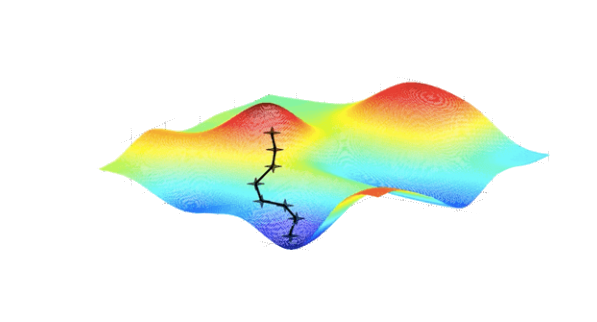
Visualization of gradient descent, a commonly used optimization algorithm in machine learning and reinforcement learning.
ReLu
Normally, Unity does not offer to modify the activation function and uses the ReLu function (f(x)=max(0,x)).
ReLU (Rectified Linear Unit) f(x) = max(0, x)
ReLU is a simple and effective function, defined as the maximum between 0 and the input x. It helps mitigate the issues of exploding or vanishing gradients and introduces sparsity in the network, which can improve model efficiency.
Swish f(x) = x · sigmoid(x)
Swish is defined as the product of the input x and the sigmoid function of x. Swish is a smooth function, offering more stable gradients and can improve performance and convergence speed in certain learning contexts.
Due to lack of time, I did not implement the Swish function (f(x)=x⋅sigmoid(x)) in the final version. However, I tested this function which seems to give good results and will likely pursue this direction in the future.
The reward system in reinforcement learning involves awarding points (rewards) to an agent based on its actions. These rewards can be positive or negative. Positive rewards encourage actions that lead to desired outcomes, while negative rewards (penalties) discourage undesirable actions. The goal is to motivate the agent to maximize its cumulative gains over the long term by learning to choose the most beneficial actions and avoid harmful ones.
The main reward used in this project is to reward the agent when it moves at a specific speed in a specific direction. To do this, we take the velocity and the average vector of its body, which we multiply by its direction relative to the target. These two values being normalized, the agent scores 1 point if it moves at the right speed and in the right direction. This value is clamped to never become negative.
To accelerate the learning speed of walking, I added a coefficient in the speed x direction reward formula. This coefficient is as follows:
This reward drastically reduces learning time, from about 24 hours to 2–4 hours in my experiments.
Unfortunately, I did not find a magical reward that encourages the agent to get up in a neat manner. The reward I used consists of a coefficient of the agent's head height ranging from 0 to 1. The other reward is a value the agent receives once standing, which stops the simulation and has a decay rate to encourage it to get up as quickly as possible.
In the first versions of the robot, its movements were very jerky. So I looked for a way to limit these untimely movements.
To solve this problem, a muscle fatigue system was added. At the beginning of the simulation, each joint starts with a value of 0 and has a recovery coefficient. If the agent does not use this joint, its value can rise to 100. Conversely, if it uses it intensively, it will go down to -100.
The agent receives as a reward 1/100 of the average fatigue of its joints.
You can see the muscle fatigue of each joint on the two screens at the back right and in the middle of the room.
The goal is to encourage the agent to only use the muscles necessary to accomplish a task that earns more points than its muscle fatigue costs, thus eliminating undesirable movements.
The very first challenge was determining how to make my agent move. Should it move its limbs directly? Use tendons? Rotation points? Having never touched a game engine, I had to explore the different solutions available to me. The first solution I tested is the only one I had used with my previous project: a simple movement of the limb on the X, Y, and Z axes. So, giving the agent the choice of direction and force to apply. I quickly realized this was not the right solution when I saw my agents flying after 10 minutes of training. I then tested simple joints. Very easy to configure, they do not offer the same freedom of movement as a shoulder and are therefore unusable for a humanoid. Then I moved on to Character Joints, thinking that with such a name, they were made for the job. They are more complicated to configure than simple joints, but still do not offer the freedom I seek. I ended up using Configurable Joints. Although imperfect and more complex, they offer good freedom in programming min and max limits, elasticity, damping, and force.
One of the biggest challenges I faced was that if I trained a model to walk, changing the slightest input value, a limit in its joints, or slightly tilting one of its sensors forced me to start all over again. Wanting to make the robot capable of getting up in addition to walking requires more freedom in its joints and additional input values. Several times, I taught my robot to walk, then when it came to getting up, I realized that a joint value would benefit from being stricter or looser, and the whole process had to start over.
The third challenge is very similar to the second. It is finding a compromise between freedom of movement, which significantly increases the time to learn to walk, and adding strict constraints, which prevent the robot from getting up but greatly simplify learning to walk.
Moreover, giving more freedom of movement through additional joints or axes also causes a "spring" effect on the limbs.
For example, for the legs, I had to add a joint at the thighs. But if I give this joint 3 axes of rotation, the spring effect prevents the agent from taking its first steps.
The only solution I found is to limit the number of axes per joint as much as possible.
So:
For the joints, I chose to make relative movements with limits written in the code to make them dynamic. The problem is that the joints can get stuck by what is called gimbal lock. To solve this problem, I had to use quaternions instead of Euler angles for joint rotation. The principle of quaternions is that we define the rotation of an object with 4 values (X, Y, Z, W). The problem arises when we start limiting the value an angle can have. Let's imagine I limit my Y and Z axes to 30° and want to give my X axis an angle of 110°. For the X axis to exceed 90°, the Y and Z axes must go from 0 to 180°, which does not fit within the limits I set and therefore poses a problem. There is also the fact that as soon as an axis is not perfectly at 0°, the rotation of another axis will change its value. The solution I found is to:
while (angle > 180f) angle -= 360f;
while (angle < -180f) angle +=360f;
This is a problem I did not unfortunately record, but which I experienced several times. If the agent is heavily penalized and finds a way out, it will take it. This can be because it has not yet discovered the right solution or because the reward system is not well balanced. The solution is relatively simple: avoid heavy penalties as long as the agent has not found all or part of the solution. I think heavy penalties are mainly good for optimizing the model and not for its learning from a blank state.
One of the issues I often encountered was a bad reward. Poorly dosed or off the mark, it can completely prevent learning. I will take as an example one of my first rewards to encourage my agent to move towards its target. At the beginning of the training session, I recorded the distance between my agent and its target to know the proportion of distance it covered, and I normalize this value from 0 when my agent is at its starting point to 1 when it is on the target. At each training step, the agent receives as a reward the proportion of distance covered. This reward works quite well at first. But very quickly, the agent understands that if it waits stupidly next to its target, it will score many more points than if it touches it and ends the simulation. The solution in this case would have been simple: give a reward when the agent touches the target more important than the one it would get by staying next to it. For example:
reward = (maxStep - currentStep) * 0.8
This encourages it to complete the course as quickly as possible.
We can see that the agent learns well to move towards its target (red ball). But once reached, it stays nearby.
One of the challenges was creating an algorithm to know what position the agent is in. Knowing if the agent is standing is quite simple. I consider it standing if:
On the other hand, knowing if the agent is on its face or back is another story. It is not enough to observe the orientation of a limb to know if the agent is on its face or back. If we take the torso, we might think that if it points to the ground, it is on its face. But it could also be sitting and just leaning forward. The solution I found is to take the average orientation of the thighs, shins, hips, and torso, then dot this value with a Vector3.Down. If the dot product is greater than 0.2, we consider it face down. Otherwise, it is on its back.
One of the problems with reinforcement learning is that the agent has to test a large number of actions before finding a combination that earns it points. To take the first step, the agent must activate certain muscles in a certain order. Once it has discovered the necessary combination for its first step, it tends to exaggerate this movement before understanding how to take the second step. If the agent learns to place its right foot first, this foot tends to dominate the left foot.
To encourage the agent to alternate feet, I tried several approaches:
To prevent the agent from lunging with one foot forward asymmetrically, I added a penalty if the foot goes too far or too high. This penalty is added as a coefficient in the previous rewards and allows for a more symmetrical walk, although it is never completely perfect.
In this excerpt, we see that the agent lunges forward with its right foot, while the left foot just catches up to the right.
There have been many iterations on how to train the robot to walk. At first, I only used the reward based on the speed of movement multiplied by orientation. This method works very well but requires a lot of training time. Initially, it took nearly 24 hours of training on 12 agents at a speed multiplied by 10. This corresponds to about 120 days of training with a single agent at normal speed.
With the improvement of the rewards mentioned earlier, the average learning time was reduced to between 2 and 4 hours (10 to 20 days) for the agent to be able to walk.
Another point is the inclination on the Y axis of the agent. At the beginning of training, I start the agent with a random value between 0° and 30°. Once the first steps are achieved, I increase this value up to 90° to teach it to turn without falling.
This video excerpt shows the evolution of the model in learning to walk.
Although the term generation does not exist in this type of learning, it represents the evolution over time.
Training to climb and descend stairs does not require a particular reward, it is the same reward used for walking.
The only parameter that can change is the maximum height of the feet.
However, this training can take a lot of time, even be impossible if the agent learned to walk without lifting its feet high enough.
A major problem encountered is that in teaching the agent to get up after teaching it to walk, it forgets how to walk. This problem is known as "catastrophic forgetting" or "catastrophic interference".
I tried several hyperparameter modifications, parallel learning, and curriculum learning. What seems to work best is to add a layer of neurons and perform asymmetric parallel learning. This involves starting by teaching the agent to walk and take its first steps before alternating between getting up and walking.
But even with this method, the agent quickly degenerates and has difficulty walking.
The solution I found is to create three neural models specific to each action, which are called upon as needed.
Training to allow the agent to get up is more complicated than for walking. Encouraging the agent to get up is not a problem in itself, the problem lies in the fact that the agent will eventually find a way to exploit the physics of the Unity engine to get up in a way that does not seem natural.
The only countermeasure I found is to place an inverse coefficient on the agent's average velocity when it is standing, as well as a heavy penalty if its feet are not in contact with the ground.
Although I am very pleased with my robot, I would have liked to make some modifications. For example, regarding its head sensors. I feel like it tilts its head to the side because they do not allow it to see the ground nearby due to lack of flexibility in the head orientation. So, tilting them by 30° would be, in my opinion, something to test in a future version.
When choosing a project, I hesitated between a humanoid robot capable of getting up and a forearm equipped with a hand to manipulate objects. I finally chose the humanoid robot. But the hand project remains pending. This hand should, for example, take a die that it should turn over to display a specific value. Or simply take an object and move it elsewhere.
This project is the culmination of four months of learning. Whether it be creating an AI, using Unity, or Blender, I have learned a lot. The field of AI is fascinating, offering very vast possibilities that are constantly evolving. At first glance, what is feasible or would benefit from being done by AI is not very intuitive. The subfield of AI that is reinforcement learning is, in my opinion, the most exciting, even though it is currently considered the last resort solution for many projects.
Toolkit used: Unity ML-Agents ↗
05 / ABOUT
I developed DELMO as part of my applied artificial intelligence training. From designing the robot to training the models, this project let me explore AI that learns by interacting with its environment.
Have a question about the project or want to discuss applied AI? Connect with me on LinkedIn.
Connect on LinkedIn ↗